Translate

Sunday, July 1, 2018

Dynamics 365 Operations | Recurring integration - REST | Package API

First thing first, learn basics of Recurring integration from below URL:

Download data [Dequeue]

Setup recurring integration export project

  1. In the System administration workspace (not the System administration module), select the Data Management IT workspace.
  2. In the work space, on the Recurring data job tab, select the recurring job to view the details. The Manage scheduled data jobs page contains a grid that lists any messages that are waiting in the queue. Therefore, you can monitor messages and the processing status.
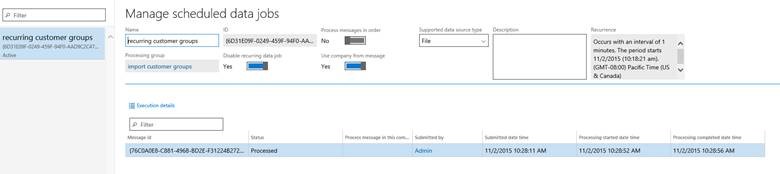
In code snippets below GUID for recurring integration means:

Activity ID, on the Manage scheduled data jobs page, ID field [GUID]

Export data

GET [Dynamics URI with https]/api/connector/dequeue/[GUID for recurring integration] HTTP/1.1
OData-Version: 4.0
OData-MaxVersion: 4.0
Content-Type: application/json;odata.metadata=minimal
Accept: application/json;odata.metadata=minimal
Accpet-Charset: UTF-8
Authorization: Bearer [access token]
Host: [Dynamics URI without https]

Download data package

GET [URI return from dequeue request] HTTP/1.1
OData-Version: 4.0
OData-MaxVersion: 4.0
Content-Type: application/json;odata.metadata=minimal
Accept: application/json;odata.metadata=minimal
Accpet-Charset: UTF-8
Authorization: Bearer [access token]
Host: [Dynamics URI without https]

Acknowledge data package download

POST [Dynamics URI with https]
/api/connector/ack/[GUID for recurring integration] HTTP/1.1
OData-Version: 4.0
OData-MaxVersion: 4.0
Content-Type: application/json;odata.metadata=minimal
Accept: application/json;odata.metadata=minimal
Accpet-Charset: UTF-8
Authorization: Bearer [access token]
Host: [Dynamics URI without https]
{
  "CorrelationId": "[return from dequeue]",
  "PopReceipt": "[return from dequeue]",
  "DownloadLocation": "[location from dequeue]"
}


Upload data [Enqueue]

POST [Dynamics URI with https]/api/connector/enqueue/[guid for recurring integration]?entity=General%20journal&company=usmf HTTP/1.1
OData-Version: 4.0
OData-MaxVersion: 4.0
Accept: application/json;odata.metadata=minimal
Accpet-Charset: UTF-8
Authorization: Bearer [access token]
Host: [Dynamics URI without https]

Request body {xml data}

Get message status

POST /data/DataManagementDefinitionGroups/Microsoft.Dynamics.DataEntities.GetMessageStatus
BODY
{
    "messageId":""
}

Dynamics 365 Operations | How to debug & restart AOS with limited administrator privileges

Environment with limited administrator privileges.

Debug

  1. D365 menu > Options > untick "Load symbols only for items in the solution"
  2. Setup a startup object.
  3. Run
  4. Go back to VS > debug > attach to process > iisexpress > attach.

Restart AOS\IIS

VS > D365 menu > Restart IIS express.

Environment where we do have administrator privileges.

  1. D365 menu > Options > untick Load symbols only for items in the solution.
  2. Setup a startup object.
  3. Run
  4. Go back to VS > debug > attach to process > show processes from all users > w3wp > attach.

Friday, February 26, 2016

Exclusive 50% discount on my eBook

Sunday, May 10, 2015

List of duties and privileges under a Role

Hi,

Use the below job to get list of duties and privileges under one or more roles.

static void getAllDutiesAndPrivilidgesUnderRole(Args _args)
{
    str                             fileName = @"C:\Users\[UserId]\Desktop\allDutiesAndPrivilidgesUnderRole.csv";

    CommaTextIo                     commaTextIo;
    FileIOPermission                permission;

    SecurityTaskEntryPoint  taskEntryPoint;
    SecurityRole            role;
    SecurityRoleTaskGrant   taskGrant;
    SecuritySubTask         subTask;
    SecurityTask            privilege;
    SecurityTask            securityTask;
    SecurableObject         securableObject;
    DictEnum                dictEnum;
    str privAOTName;
    str dutyAOTName;
    str privName;
    str dutyName;
    str entrName;
    str accessLevel;
    str menuItemType;

    FromTime                    startTime = timeNow();

    #File
    ;

    permission = new FileIOPermission(fileName,#io_write);
    permission.assert();
    commaTextIo = new CommaTextIo(fileName,#io_write);

    //Header
    commaTextIo.write(
        "Role AOT name",
        "Description",
        "Duty AOT name",
        "Description",
        "Privilidge AOT name",
        "Description",
        "Entry point",
        "Type",
        "Access level");

    while select taskEntryPoint
    join subTask
        where subTask.SecuritySubTask == taskEntryPoint.SecurityTask
    join taskGrant
        where taskGrant.SecurityTask == subTask.SecurityTask
    join role
        where role.RecId == taskGrant.SecurityRole
        //&&  role.AotName like 'Sales*'
        //|| role.AotName like 'System*'
    {
        menuItemType    = "";
        dutyAOTName     = "";
        dutyName        = "";
        privAOTName     = "";
        privName        = "";
         if (subTask.RecId)
        {
            switch (taskEntryPoint.PermissionGroup)
            {
                case AccessRight::View:
                    accessLevel = "Read";
                    break;
                case AccessRight::Edit:
                    accessLevel = "Update";
                    break;
                case AccessRight::Add:
                    accessLevel = "Create";
                    break;
                case AccessRight::Delete:
                    accessLevel = "Delete";
                    break;
                default:
                    accessLevel = "";
                    break;
            }
        }

        select privilege
            where privilege.RecId == taskGrant.SecurityTask
            && SecurityTaskType::Duty == privilege.Type;

        dutyAOTName = privilege.AotName;
        dutyName = privilege.Name;

        select privilege
            where privilege.RecId == subTask.SecuritySubTask
            && SecurityTaskType::Privilege == privilege.Type;

        privAOTName = privilege.AotName;
        privName = privilege.Name;

        select RecId, Type, Name from securableObject
        where securableObject.RecId == taskEntryPoint.EntryPoint && (securableObject.Type == SecurableType::MenuItemDisplay
            || securableObject.Type == SecurableType::MenuItemAction || securableObject.Type == SecurableType::MenuItemOutput);

        dictEnum = new DictEnum(enumNum(MenuItemType));
        menuItemType = dictEnum.index2Name(securableObject.Type);

        commaTextIo.write(role.AotName,
                            role.Name,
                            dutyAOTName,
                            dutyName,
                            privAOTName,
                            privName,
                            securableObject.Name,
                            menuItemType,
                            accessLevel);
        }
    //sometimes a role has a privielge direclty assigned instead of a duty. So this code is for those privileges.
    //In this case duty will not exist.
    while select SecurityTask, SecurityRole from taskGrant
        join RecId, Type, AOTName from securitytask where securityTask.RecId == taskGrant.SecurityTask
                && taskGrant.SecurityRole == taskGrant.SecurityRole && securitytask.Type == SecurityTaskType::Privilege
        join securityTask, EntryPoint from taskEntryPoint where taskEntryPoint.SecurityTask == securitytask.RecId

        {
            menuItemType    = "";
            dutyAOTName     = "";
            dutyName        = "";
            privAOTName     = "";
            privName        = "";

            select RecId, Type, Name from securableObject
                where securableObject.RecId == taskEntryPoint.EntryPoint && (securableObject.Type == SecurableType::MenuItemDisplay
                    || securableObject.Type == SecurableType::MenuItemAction || securableObject.Type == SecurableType::MenuItemOutput);

            if(securableObject)
            {
                select privilege
                    where privilege.RecId == securityTask.RecId
                    && SecurityTaskType::Privilege == privilege.Type;

                privAOTName = privilege.AotName;
                privName = privilege.Name;

                dictEnum = new DictEnum(enumNum(MenuItemType));
                menuItemType = dictEnum.index2Name(securableObject.Type);

                commaTextIo.write(role.AotName,
                        role.Name,
                        dutyAOTName,
                        dutyName,
                        privAOTName,
                        privName,
                        securableObject.Name,
                        menuItemType,
                        accessLevel);
            }
    }
    CodeAccessPermission::revertAssert();
    info(strFmt("Total time: %1", timeConsumed(startTime, timeNow())));
}


Sunday, May 3, 2015

SSRS send report as attachment in email using Batch

Hi Folks,

As the standard AX 2012 feature we can schedule any report to send it as attachment on periodic basis. Though standard SysMailerNet class fails if you do not provide any email id in cc. To fix this issue; change the quickSend method of SysMailerNet class as mentioned below:

public void quickSend(str fromAddr, str toAddr, str subject, str body, str cc='', str attachments='')
{

    SysMailerNetAddressField tos;
    SysMailerNetAddressField ccs;
    SysMailerNetAttachments mailAttachments;
    SysEmailParameters parameters;

    List emailAddresses;
    ListEnumerator enum;
    ;

    this.fromAddress(fromAddr);

    tos = this.tos();
    emailAddresses = SysEmailDistributor::splitEmail(toAddr);
    enum = emailAddresses.getEnumerator();
    while(enum.moveNext())
    {
        tos.add(enum.current());
    }

    this.subject(subject);
    this.htmlBody(body);

    //USR-Start
    ccs = this.ccs();
    emailAddresses = SysEmailDistributor::splitEmail(cc);
    enum = emailAddresses.getEnumerator();
    while(enum.moveNext())
    {
        ccs.add(enum.current());
    }

    /*if (!prmisDefault(cc))
    {
        ccs = this.ccs();
        ccs.add(cc);
    }*/
    //USR-End

    if (!prmisDefault(attachments))
    {
        mailAttachments = this.attachments();
        mailAttachments.add(attachments);
    }

    this.priority(System.Net.Mail.MailPriority::Normal);

    parameters = SysEmailParameters::find();

    if (parameters.smtpRelayServerName)
    {
        this.smtpRelayServer(parameters.smtpRelayServerName,parameters.smtpPortNumber,parameters.smtpUserName,SysEmailParameters::password(),parameters.ntlm);
    }

    this.sendMail();

}

How to add Printer lookup in AX 2012

1. Create a class or add below method to use it globally:

Class printers
{

}

//This method loads all available printers to a Map object 
static Map printerMap()
{
    Microsoft.Dynamics.AX.Framework.Reporting.Shared.PrinterHelper printerHelper;
    Microsoft.Dynamics.AX.Framework.Reporting.Shared.PrinterInfo printerInfo;
    System.Collections.ArrayList names;
    System.Collections.IEnumerator enumerator;
    Map         printerMap;

    str name;
    int printerStatus;
    str driverName;
    str portName;
    str comments;
    int jobCountSinceLastReset;

    if(!printerMap)
    {
        printerMap = new Map(Types::String, Types::Container);

        // BP Deviation documented
        printerHelper = new Microsoft.Dynamics.AX.Framework.Reporting.Shared.PrinterHelper();
        names = printerHelper.get_PrinterNames();
        if (names != null)
        {
            enumerator = names.GetEnumerator();
            while (enumerator.MoveNext())
            {
                name = enumerator.get_Current();
                printerInfo = printerHelper.GetPrinterInfo(name);

                // BP Deviation documented
                printerStatus           = CLRInterop::getAnyTypeForObject(printerInfo.get_PrinterStatus());
                // BP Deviation documented
                driverName              = CLRInterop::getAnyTypeForObject(printerInfo.get_DriverName());
                // BP Deviation documented
                portName                = CLRInterop::getAnyTypeForObject(printerInfo.get_PortName());
                // BP Deviation documented
                comments                = CLRInterop::getAnyTypeForObject(printerInfo.get_Comment());
                // BP Deviation documented
                jobCountSinceLastReset  = CLRInterop::getAnyTypeForObject(printerInfo.get_JobCountSinceLastReset());

                printerMap.insert(name, [name, printerStatus, driverName, portName, comments, jobCountSinceLastReset]);
            }
        }
    }

    return printerMap;
}

2. Build lookup Method

public static void printerLookup(FormControl _formControl)
{
    SysTableLookup                  sysTableLookup;
    TmpTableFieldLookup             tmpTableFieldLookup;
    Enumerator                      en;
    List                            entitylist      = new list(types::String);
    Map                             printerMap;
    MapEnumerator                   enumerator;
    PrinterName                     printerName;

    printerMap          = printerMap();//If above method was created in Global class else call specific class 
    enumerator          = printerMap.getEnumerator();
    while (enumerator.moveNext())
    {
        printerName = enumerator.currentValue();
        entitylist.addend(printerName);
    }

    en = entityList.getEnumerator();

    while (en.moveNext())
    {
        tmpTableFieldLookup.TableName = en.current();
        tmpTableFieldLookup.insert();
    }

    sysTableLookup = SysTableLookup::newParameters(tableNum(tmpTableFieldLookup), _formControl);
    sysTableLookup.addLookupfield(fieldNum(TmpTableFieldLookup, TableName));
    sysTableLookup.setLabel("@SYS62708");

    //BP Deviation documented
    sysTableLookup.parmTmpBuffer(tmpTableFieldLookup);
    sysTableLookup.performFormLookup();
}


Get all fields name, type and label of any AOT table or view


Below jobs enables to get list of fields, base data type and label for any particular table.


Output: