Translate

Thursday, February 2, 2012

AX 2012 Setup - Hyper V on Virtual Box (Step by Step)


AX 2012 Setup - Hyper V on Virtual Box (Step by Step)

Read full post at : http://dynamicsnavax.blogspot.com.au/2011/04/how-to-run-ax2012-hyperv-on-virtualbox.html

Download virtual box and the extension pack.
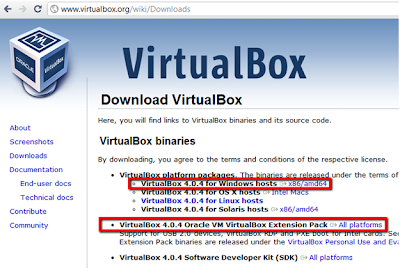

 2. Once you have installed, create a new virtual machine.


3. Select Windows 2008 64bit


4. Allocate a good portion of memory (4GB recommended)


6. Un-tick the boot Hard Disk. Add disks manual after the wizard is finished.


7. Click on your new virtual image settings


8. Navigate to Storage
Add hard disks by clicking the disk icon – then “Choose existing disk”
Repeat this step for all 3 vhd files.
·         AX5-W8R2-01.vhd
·         AX5-W8R2-01_DB.vhd
·         AX5-W8R2-01_PF.vhd


9. After you have finished. Settings should look like this:


10. Start your image


Configure sharepoint 
After you have managed to get it to start, there are a couple other things to be aware of:
1. Start the AOS by going to the windows services and start manually
2. All seems to work except for Enterprise Portal
To fix this modify your hosts file “C:\Windows\System32\drivers\etc\Hosts”
Open this file with notepad and add in the line
                127.0.0.1              Sharepoint
                127.0.0.1              dynamicsax.contoso.com
It should look like this:


3.  When you run a report - it will be slow on first run. Don't kill it; leave it for a few minutes. Mine took ~4minutes to run first time. After that, it is very responsive. Standard SSRS caching.


Enjy.. :)


Friday, January 27, 2012

Creating a Reporting Services Report Using Cube

Very nice vedio, demonstrating How to create a SSRS report using Cube as a datasource.

http://www.sqlservercentral.com/articles/Video/64190/

Dynamics AX 2012 Data Import using Excel Add-in

Hy All,

During last few weeks I was very much wondering that How master data can be uploaded to Ax via Excel, it's pretty much painful activity as compared to previous Ax versions.

Just came across a very nice blog, which explains how to import all master data to Ax via Excel.

http://ax2012exceldataimport.blogspot.com/ by  Alex Anikiev

Mukesh Hirwani

Tuesday, January 24, 2012

Setting Up Database Mail

Select all months bewtween two dates


 No loops... no recurrsion... nice tight code...

;with Numbers (Number) as
 (select row_number() over (order by object_id)
 from sys.all_objects)
select dateadd(month, number, @StartDate)
from Numbers
where number <= datediff(month, @StartDate, @EndDate)

Thursday, January 5, 2012

AX 2012 - Data & Code Upgrade

Hy Folks,

During last few days, I have been researching for Up gradation & Migration Help for DAX 2012. So here are few very useful links available which helps a lot in performing same activity.


Enjoy Ax 2012.. :)


Friday, December 30, 2011

AX2012 Hands on Labs

Friends,
There are hands on lab session on AX2012 available on Partner Source. For more information please refer the following link here

Topics covered in the hands-on lab are as follows:

1.  Workflow Implementation
2.  Accounts Payable
3.  Accounts Receivable Enhancements
4.  Expense Management
5.  Migrating Reports to SSRS
6.  Employee Procurement
7.  Client Forms
8.  Export Extend and Refresh
9.  Edit Budgets in Excel
10. Sales Quotations in Word
11. Import Data Using Excel
12. Project Accounting